
What players say
Panda Klondike Solitaire delivers the familiar Klondike experience with a few considerate additions. The two draw modes cater to different skill levels, while unlimited hints and undo reduce frustration without forcing assistance. Customization and handedness options show attention to comfort. The panda theme is decorative rather than mechanical, so purists need not worry about altered rules. It best suits players who want classic solitaire with a gentle presentation and flexible difficulty.
About this game
Classic Solitaire with a Panda Twist
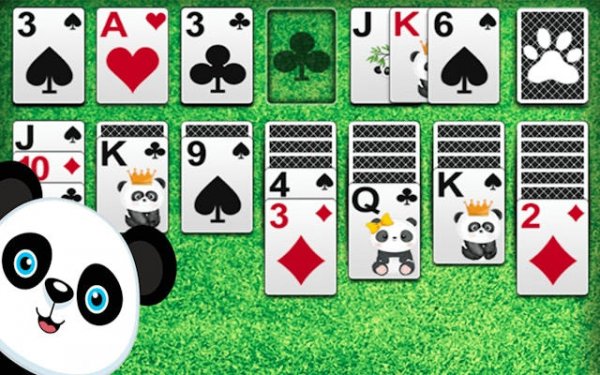
Panda Klondike Solitaire sticks to the traditional Klondike rules: arrange cards on the tableau in descending order with alternating colors, then build four foundation piles by suit from Ace to King. Each deal presents a fresh puzzle that rewards planning over speed. A panda companion appears throughout, adding a friendly presence without altering the rules.
Two Draw Modes, Two Challenges
You can choose between Draw 1 Card mode and Draw 3 Cards mode. Draw 1 gives you a higher chance of winning because you see more cards per pass through the deck. Draw 3 demands more careful planning and memory, as you must track which cards have passed and anticipate future moves. Both modes use the same tableau and foundation rules, but the pace and difficulty differ noticeably.
Tools That Keep the Game Moving
If you get stuck, unlimited free hints offer suggestions without penalty. Unlimited undo lets you reverse moves and test alternative strategies. An auto-complete toggle can be switched on for an assisted finish or off if you prefer to place every card yourself. These tools are optional; you can play a strict game or use them freely.
Comfort and Customization
The game includes left-handed and right-handed modes, so controls sit where you expect. You can also change card faces, card backs, and board backgrounds. Soothing sounds and a clean layout aim to create a calm atmosphere. Because the rules are standard Klondike, anyone familiar with solitaire can start immediately, while newcomers can learn through play and hints.
Compatibility
FAQ
Player comments
Sign in to comment
You must be logged in before posting a review or rating.
No comments yet. Be the first to comment!






Editorial Notes