
What players say
Quick Math Challenge does one thing and does it without clutter: timed addition problems, multiple-choice answers, and a run that ends on the first mistake. The blackboard presentation and silent feedback keep attention on the numbers. Randomization and a persistent high score give it replay value, and browser-only access removes setup friction. It suits students and casual players seeking short mental-math practice, though anyone wanting varied operations or deeper progression will find the scope narrow.
About this game
Solving Under the Clock
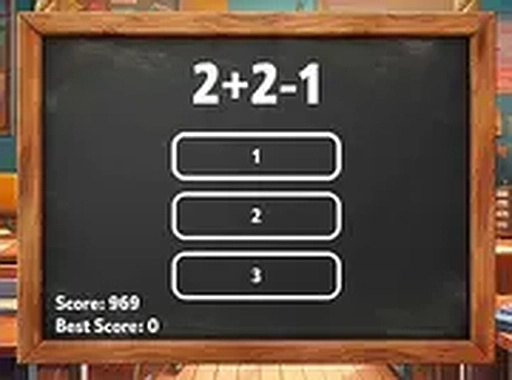
Quick Math Challenge strips arithmetic down to a single loop: an addition problem appears on a virtual blackboard, several possible answers sit below it, and you click or tap the one you believe is correct. A right answer adds to your score and immediately loads the next equation. A wrong answer, or letting the timer run out, ends the session. That one-strike rule is the source of tension. You cannot guess your way through; every selection carries the full weight of the run, so the game rewards steady calculation rather than frantic tapping. Because each session draws a fresh random set of problems, memorizing answers is not a viable strategy.Blackboard Presentation
The visual design mimics a traditional classroom blackboard. Chalk-style text sits against a dark background, and the interface stays deliberately bare: no menus, no decorative animations, no clutter competing for attention. Feedback is equally restrained. A brief color change or subtle effect confirms whether your choice was right or wrong, then the game moves on. That minimalism serves the mechanic well, since anything flashier would slow the rhythm between questions. The layout scales to both desktop and mobile screens without losing legibility, so the same clean presentation holds whether you are at a keyboard or holding a phone.Score Tracking and Session Length
A high score tracker records your best run, giving you a concrete number to chase rather than a vague sense of improvement. Rounds are short by design, which makes the game easy to fit into spare minutes and easy to restart after a failed attempt. The timer applies steady pressure without being punishing, and over repeated sessions that pressure nudges your reaction time and recall downward. Randomization keeps each attempt distinct, adding replay value that a fixed question bank would not provide.Access and Privacy
Quick Math Challenge runs entirely in a web browser. There is nothing to download, no installation step, and no account to create. Controls are limited to mouse clicks on desktop and finger taps on touchscreens, with a full-screen option available for a distraction-free view. The game does not collect personal information, which keeps the experience private and simple. That combination of zero setup and honest scope makes it practical for students, casual players, or anyone wanting a short mental break.Compatibility
✅ Works on PC & Mobile | Recommended: Chrome / Safari / Edge
FAQ
Does Quick Math Challenge require any download or account?
No. The game runs entirely in a web browser, so there is nothing to install and no account to register. You load the page and start playing immediately. This also means progress like your high score is not tied to a profile you can log into from another device.
What exactly ends a run in Quick Math Challenge?
A single incorrect answer or letting the timer expire ends the session. There are no extra lives or second chances within a run. That strict rule is intentional: it forces careful reading of each equation instead of rapid guessing, and it makes every high score a genuine reflection of accuracy under time pressure.
Can I play Quick Math Challenge on a phone?
Yes. The interface adapts to both desktop and mobile screens, and the controls are simple taps on touchscreens or clicks with a mouse. A full-screen mode is available if you want to remove browser distractions. The clean layout keeps the numbers readable at smaller sizes, so phone play is practical.
Are the math problems the same every time I play?
No. Each session generates a random set of addition problems, so no two attempts are identical. This prevents players from memorizing a fixed sequence of answers and keeps the challenge centered on actual calculation. It also means a high score reflects consistent skill rather than familiarity with specific questions.
Is Quick Math Challenge suitable for younger players or students?
The game focuses purely on addition with a timer, which makes it a reasonable fit for students practicing mental arithmetic. The blackboard theme and minimal interface keep it approachable, and short rounds suit brief study breaks. There is no violent, mature, or competitive multiplayer content to consider, since it is a solo browser quiz.
What does the high score tracker actually do?
It records your best performance across sessions, giving you a specific target to beat. Because the problems are randomized, improving that number requires genuine gains in speed and accuracy rather than repeating a known pattern. The tracker is the main long-term motivation in a game that otherwise offers no level progression or unlocks.
Player comments
Sign in to comment
You must be logged in before posting a review or rating.
No comments yet. Be the first to comment!







Editorial Notes