
What players say
Space Orb keeps its scope narrow: one input, one orb, and a track that speeds up until you miss a jump. That simplicity is the main strength, because it makes the game easy to start and hard to put down when chasing a personal best. The colorful space theme and lack of violent content widen its appeal. Players who want deep progression or varied mechanics may find it limited, but as a short-session reflex game it delivers a clear, repeatable challenge.
About this game
One-Tap Survival on a Space Track
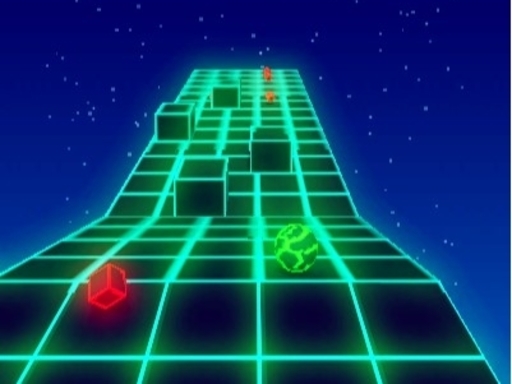
Space Orb places players in control of a bouncing orb that travels forward automatically along a track dotted with obstacles. The only input required is a tap or click to jump. Timing matters more than speed of input: obstacles vary in height and spacing, so a jump that clears one barrier may leave the orb vulnerable to the next. Each obstacle passed adds to the score, and a single collision ends the run immediately. That structure keeps every session focused on a single question: how long can you keep the orb moving?
How Difficulty Scales
The game does not introduce new buttons or mechanics as you play. Instead, it raises the speed gradually. Early obstacles arrive with generous gaps, giving new players room to learn the jump rhythm. As the orb accelerates, those same gaps close in practical terms, demanding faster recognition and cleaner timing. The difficulty curve is therefore tied directly to your score: the longer you survive, the less margin each jump allows. This makes personal bests meaningful, because a higher score reflects both longer survival and the ability to handle faster obstacle patterns.
Visual Style and Session Length
Bright, colorful space-themed visuals distinguish the track and obstacles without adding clutter. The presentation supports the arcade and hypercasual design: runs are short, restarts are quick, and there are no complex rules or hidden systems to learn. Players can fit a session into a few minutes or extend play across multiple attempts. The game tracks the highest score, giving repeated runs a clear purpose. Because there are no violent or frightening elements, the content stays appropriate for a wide age range, though the reflex demands still provide a genuine challenge.
Approaching Higher Scores
Improvement in Space Orb comes from pattern recognition rather than unlockable upgrades. Watching the track ahead helps you anticipate whether the next obstacle needs an early or late jump. Staying calm as speed increases prevents rushed inputs, which are the most common cause of collisions. Setting small targets, such as beating your previous score by a few points, turns each run into a measurable step forward. Consistency and patience matter more than any single attempt, since the game rewards players who learn the rhythm of obstacle appearances over time.
Compatibility
FAQ
Player comments
Sign in to comment
You must be logged in before posting a review or rating.
No comments yet. Be the first to comment!
Editorial Notes